






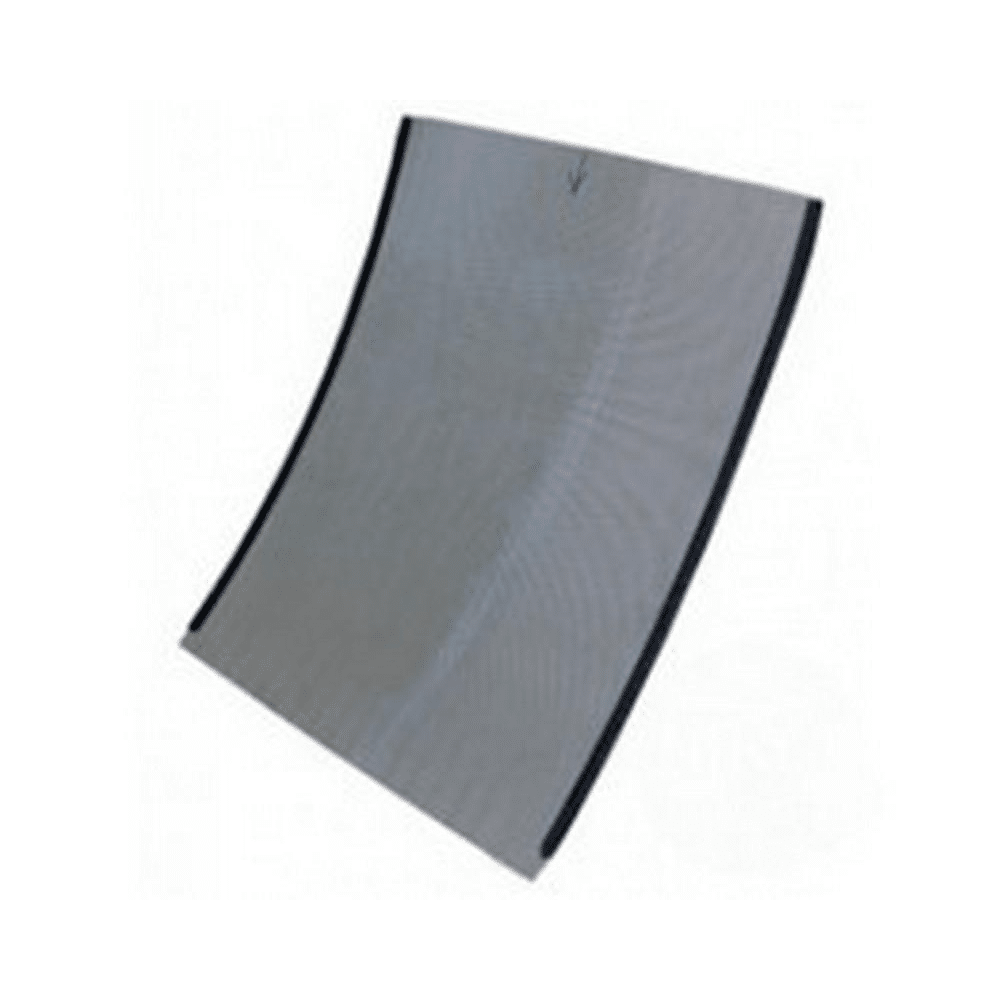
AquaForte UltraSieve III Replacement Screen – 200 Micron
| Brand | |
|---|---|
| Filter model | UltraSieve III / UltraSieve 3 |
| Screen grade | 200 micron |
| EAN | 8717605072098 |
A 200 micron replacement stainless steel sieve element for the AquaForte UltraSieve III / UltraSieve 3 prefilter. The UltraSieve III manual specifies a 345 × 450mm screen. Replacement element only; check the filter model and existing micron grade before ordering.
£235.00 (inc VAT)
AquaForte UltraSieve III Replacement Screen — 200 Micron
A stainless steel sieve element for your UltraSieve 3 prefilter
This 200 micron replacement screen is for the AquaForte UltraSieve III, also known as the UltraSieve 3. It replaces the curved sieve element inside the prefilter. Choose it when you need the 200 micron element for an existing unit, rather than a complete filter, lid or replacement float assembly.
The UltraSieve separates solid waste from flowing pond water before that water continues through the filtration system. Its screen uses closely spaced stainless steel profile wires: water passes through the narrow gaps while larger particles remain on the screen. The 200 micron rating is equivalent to a gap of 0.2mm and is finer than the alternative 300 micron grade.
Check both the model and the micron grade
Check the filter’s model label before ordering. UltraSieve III, MidiSieve and the wider UltraSieve models are not interchangeable names. Match the replacement to the filter itself, particularly if the sieve was supplied as part of a larger filter package or has been bought second-hand.
Also check the grade currently fitted. This is the 200 micron screen. A screen described simply as an UltraSieve replacement may have a different micron rating, even where its outline looks similar. If you want to change from a different grade, confirm suitability for your installation before ordering.
What the 200 micron rating means
A micron is one thousandth of a millimetre, so 200 microns equals 0.2mm and 300 microns equals 0.3mm. These figures describe the screen openings, not the thickness of the steel or the size of the whole panel. A lower micron number means a finer opening. It does not describe the filter’s maximum pond size, the pump setting or a percentage of waste removed.
Use the existing installation as your starting point when choosing a replacement. Check the screen grade as well as the filter name, and continue to monitor the screen after fitting. The amount and type of debris reaching it can change through the season, particularly when leaves or strands of algae are entering the prefilter.
Screen dimensions and construction
The manufacturer’s UltraSieve III manual specifies a 345 × 450mm sieve bend made from 316 stainless steel, with 200 and 300 micron versions. This listing is the 200 micron version. Those dimensions refer to the sieve element, not the external filter housing.
| Filter model | AquaForte UltraSieve III / UltraSieve 3 |
|---|---|
| Screen grade | 200 micron / 0.2mm |
| Sieve bend dimensions | 345 × 450mm, as specified in the UltraSieve III manual |
| Screen material | 316 stainless steel, as specified in the UltraSieve III manual |
| Supplied item | Replacement sieve element |
Cleaning or replacement?
A screen with deposits on its surface may need cleaning rather than replacement. Inspect the existing element for damaged wires, distortion and accumulated material before deciding which part is required. Replacing the screen does not repair a damaged float, an incorrectly operating inlet weir or a problem with the circulation pump.
The manufacturer recommends daily inspection of the UltraSieve and distinguishes routine removal of surface waste from cleaning deposits between the profile wires. Follow the filter manual for access and cleaning: the screen can be removed after the water guide is taken out. Keep the removed screen supported and avoid bending it while handling or storing it.
Surface waste and deposits within the slots need different attention. Clearing the visible collection of debris may leave a film or material between the wires, so inspect how water passes through the screen after cleaning. Follow the manufacturer’s cleaning instructions rather than scraping, widening or otherwise modifying the slots. Their spacing is what gives the element its filtration grade.
When the screen is refitted, check that it sits correctly in its original position and watch the water path when the filter returns to operation. Water should follow the designed route across and through the screen. An incorrectly seated element needs correcting before you rely on the prefilter to separate debris.
Choosing the right replacement part
If you need help identifying the element, send That Pond Guy photographs of the complete filter, its model label and the existing screen. A clear view of the screen’s sides and any markings will help distinguish it from a different sieve model. Include the dimensions of your existing element if the label is missing.
This listing supplies the replacement screen only. For other components, see our filter spares. Continue to follow the manufacturer’s operating instructions after replacement and check the water flow through the screen when restarting the system.
Read the UltraSieve III instruction manual for the screen-removal illustrations, maintenance guidance and specifications. Keep it with your filter records so that future replacement parts can be selected against the actual equipment.




Reviews
There are no reviews yet.