






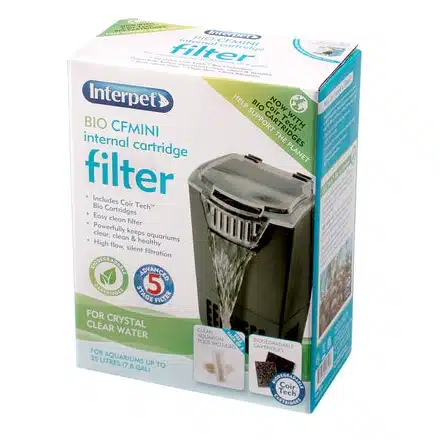
Interpet Bio-CF Mini Internal Cartridge Filter (2310)
| Brand | |
|---|---|
| Model | Bio-CF Mini |
| Manufacturer article | 2310 |
| Maximum water flow | 130 L/h |
| Power | 3.5 W |
| Aquarium guide | 12–35 L |
| Filter type | Internal cartridge filter |
| Cartridge system | Coir Tech front and back cartridges |
| Biological media | Ceramic media included |
| Water return | Cascade |
| Selling unit | One complete filter |
| Replacement refills | Bio-CF Mini service packs, sold separately |
Bio-CF Mini internal cartridge filter with 130 L/h maximum water flow and 3.5 W power. Interpet’s aquarium guide is 12–35 L. Supplied with ceramic biological media, Coir Tech cartridge media and Clean Aquarium Pods; replacement service packs are sold separately.
£20.21 (inc VAT)
Top-access filtration for your aquarium
The Interpet Bio-CF Mini puts top-access cartridge filtration into a compact aquarium filter for the manufacturer’s 12–35 litre aquarium guide. It combines a 130 L/h maximum water flow with a 3.5 W pump, ceramic biological media and Coir Tech cartridge media. The water returns through a cascade, while the hinged lid gives access to the cartridge positions for routine replacement.
Compare the available equipment in our Aquarium range when planning the filter, heater and maintenance space together.
Choosing and positioning Bio-CF Mini
Choose the Mini around the aquarium and its inhabitants, rather than treating its maximum flow as a stocking allowance. The 12–35 litre figure is Interpet’s aquarium guide; fish size, feeding and the maintenance routine still matter. Check the space beside the glass and beneath the hood, including room to lift the lid and remove the cartridges vertically.
The Mini has its own mounting arrangement. The Bio-CF instructions describe suckers on the back of the filter for direct attachment inside the aquarium, plus a locator hook for a suitable aquarium edge. Follow the Mini instructions for the hook and supplied vibration dampers. The larger Bio-CF1/2 support-cradle arrangement should not be assumed when planning the Mini installation.
| Specification | Details |
|---|---|
| Brand | Interpet |
| Model | Bio-CF Mini |
| Manufacturer article | 2310 |
| Maximum water flow | 130 L/h |
| Power | 3.5 W |
| Aquarium guide | 12–35 L |
| Filter type | Internal cartridge filter |
| Cartridge system | Coir Tech front and back cartridges |
| Biological media | Ceramic media included |
| Water return | Cascade |
| Selling unit | One complete filter |
| Replacement refills | Bio-CF Mini service packs, sold separately |
The Bio-CF Mini covers Interpet’s 12–35 L guide at a maximum 130 L/h. The next models are Bio-CF1, guided for 36–68 L at 320 L/h, and Bio-CF2, guided for 69–110 L at 480 L/h. Compare the model guide with your aquarium volume and inhabitants, and allow room for cartridge access.
What the filter includes
Interpet lists the filter, hinged lid, mounting parts, ceramic media, Bio Cartridge and Clean Aquarium Pods in the box. The ceramic media provides a place for biological filtration to develop, while the cartridge media traps fine waste and includes an activated-carbon stage.
This page describes the current Bio-CF design with Coir Tech cartridge media. Keep the correct model name to hand when buying refills, because the Mini, CF1 and CF2 service packs are different sizes.
Cartridge changes and routine care
The Bio-CF instructions specify replacing the front and back Coir Tech cartridges after 28 days of use. Open the hinged lid and lift each cartridge vertically from its position, then fit the correct new cartridges. Replacement service packs are purchased separately; choose the Bio-CF Mini version.
Check that the filter is running and water is moving normally as part of everyday care. Maintain the aquarium water level and keep plant debris and substrate clear of the intake. The instructions also describe periodic intake and impeller cleaning; follow the complete manual for that work. Disconnect the filter from the electricity supply before maintenance, and arrange its cable with a drip loop. It is intended for indoor use.
Keep the biological filter in mind
Allow the biological filtration to establish and monitor aquarium water, particularly during a new setup or changes to the fish population. Continue the aquarium’s water-change and feeding routine alongside cartridge maintenance. Ceramic biological media, disposable Coir Tech cartridges and Clean Aquarium Pods have different roles, so use the instructions for each rather than treating every filter component as a monthly replacement.
Photograph: Bio-CF Mini packaging photograph. One Bio-CF Mini filter is supplied.
Questions about this filter
What is supplied with this filter?
Interpet lists the filter, hinged lid, mounting parts, ceramic media, Bio Cartridge and Clean Aquarium Pods. Replacement service packs are sold separately.
How should I use the aquarium-size guide?
Interpet’s guide for the Bio-CF Mini is 12–35 L. Consider the actual fish, feeding and maintenance as well as aquarium volume. The separate 130 L/h specification is maximum water flow, rather than an extra stocking allowance.
How is this model mounted?
The Mini instructions describe direct attachment to the inside glass with its rear suckers. A locator hook provides an alternative for a suitable aquarium edge; follow the manual for its vibration-damper arrangement and check that the hood still fits.
Which replacement cartridges should I choose?
Choose service packs specifically named for Bio-CF Mini. The manufacturer lists the one-month article 2315 and three-month article 2316 for this model. Check how many replacement cartridges are included in the pack you choose.
When are the Coir Tech cartridges changed?
The Bio-CF instructions specify replacing the front and back Coir Tech cartridges after 28 days. Lift each vertically from its slot through the opened lid and install the correct replacements, following the complete filter instructions.
What should I check if the return flow changes?
Check the aquarium water level and the intake for plant matter or other debris, and review the cartridge condition and replacement date. Follow the manual’s intake and impeller maintenance instructions, and disconnect the filter from the electricity supply before maintenance.
Does a new filter make the aquarium biologically mature straight away?
Biological filtration takes time to establish. Monitor water quality during a new setup and changes in stocking, and continue the recommended water-care routine. Supplied media and Pods do not remove the need to look after the aquarium water.



Reviews
There are no reviews yet.